Since version 2027.1, No Treat Today can look at your plate. It is optional, it never logs anything by itself, and you can hide it entirely. Here is the whole feature in one page.
Where it is
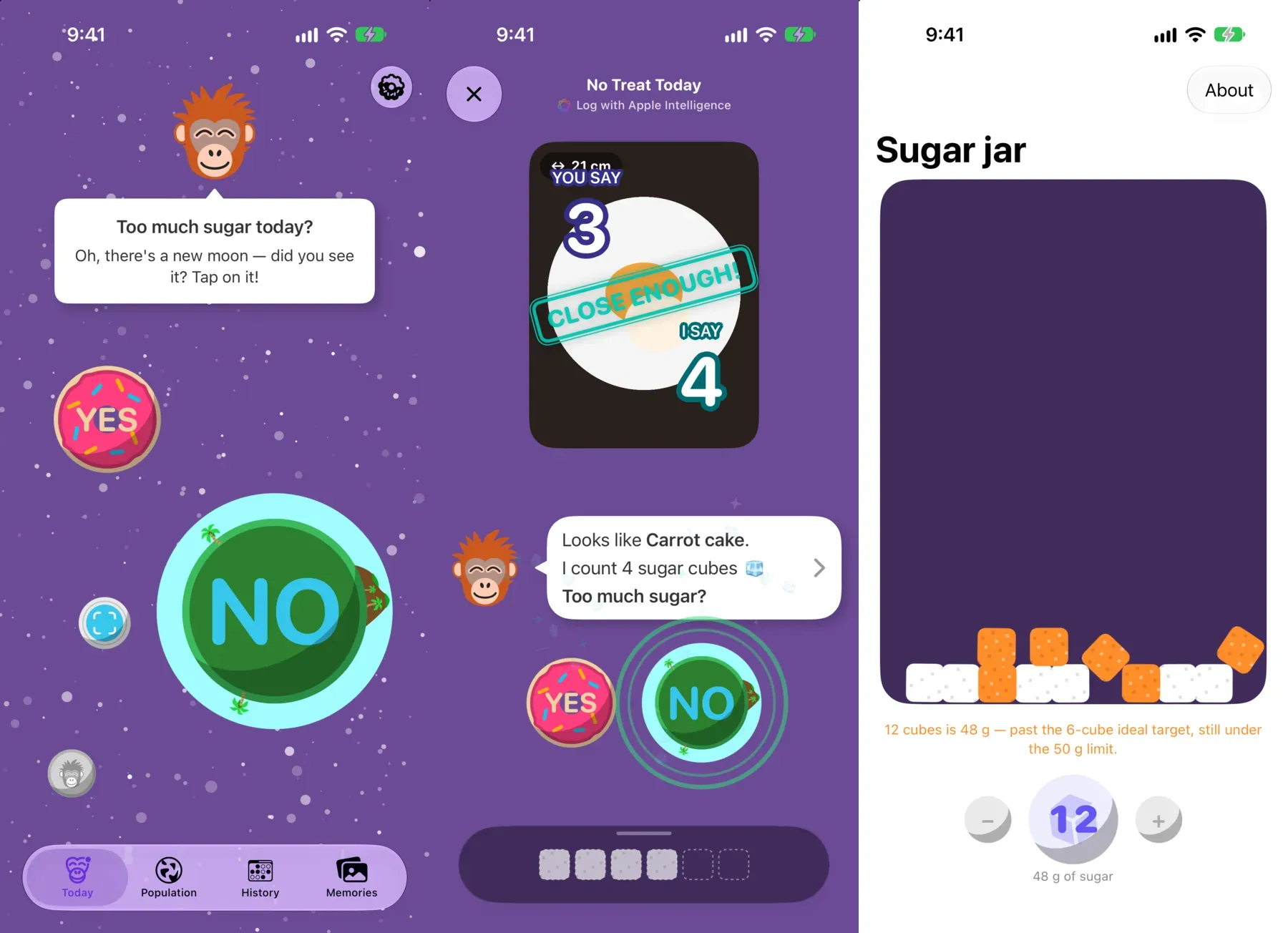
On Today, a small camera moon orbits the planet. Tap it to photograph your plate, or import a photo you already took. The moon also appears inside the meal editor, so you can scan a meal you have already started logging.
What happens next
- Apple Intelligence looks at the picture and suggests the foods it sees. They arrive as chips, each with its sugar attached to your portions. Remove any that are wrong.
- The plate’s sugar rains down the screen as cubes. A cube is 4 g, a teaspoon — the unit the WHO counts in.
- Crush asks Too much sugar? You answer YES or NO exactly as you always have. Nothing is logged until that tap.
If you like, guess first: before Crush gives his number, wager a moon on how many cubes were on the plate. He tells you how close you were.
The sugar jar
The meter counts in two steps. Cubes past the six-cube allowance (about 24 g, just under the 25 g the WHO conditionally recommends) turn amber. Only cubes past a ceiling you set yourself turn red. That ceiling starts at twelve cubes, 48 g, just under the 50 g the WHO recommends nobody pass in a day.
Change it in Settings › Sugar jar, or with Edit on the scan’s meter: pour the cubes into the jar and see how big a day you are allowing. The screen marks where the WHO’s own limit falls.
Say what the camera can’t see
Tap the microphone under the viewfinder and describe the plate out loud: “there is frosting under the fruit”, “the coffee has syrup”. Your words appear as you speak and travel with the photo, so the estimate knows what it could not see. Dictation runs on your device; the first time, the language pack downloads itself.
If it gets it wrong
It will, sometimes. Remove a chip, or tap Analyze again on the details page to send the same photo back and keep whichever reading matches what you ate. Every food in the result has its own page with the quantity, the sugar, and where those numbers come from. The end of every scan opens How scanning works, which explains what the model is asked and the assumptions it makes.
What it needs
- iOS 27 or later, on a device with Apple Intelligence.
- An internet connection: the analysis runs on Apple’s Private Cloud Compute, not on the phone.
- A daily allowance. iCloud+ raises it.
Everything else in the app keeps working offline, on iOS 17 and later.
Your photos
Scanning runs on Private Cloud Compute. Your photos are never stored there, never used to train anything, and Apple cannot read them. The copy you keep stays on your phone and in your own private iCloud, which I have no way to read either.
Two things you can change in Settings (the gear at the top right of Today):
- Meal — photos you keep are saved to your photo library like any other shot. Switch that off here.
- Planets & Moons — hide the camera moon if you would rather not see it. Everything else stays as it was.
Memories
Every plate you photograph becomes a card in the Memories tab, one per day. Filter them, give one a heart, five stars or a bookmark, and bring a bookmarked memory into any meal with the Memories button beside Food and Plate.